Wednesday, November 30, 2011

DPM agent versions

DPM 2010

DPM 2010 3.0.7696.0
DPM 2010 role-up 1 (KB2250444) 3.0.7706.00
DPM 2010 role-up 2 (KB2465832) 3.0.7707.0

DPM 2007

DPM 2007 SP0 - 2.0.5820.0
DPM 2007 SP1 - 2.0.8793.0
DPM 2007 SP1 (with KB 968579) 2.0.8836.0
DPM 2007 SP1 (with KB970867) 2.0.8840.0
DPM 2007 SP1 (with KB970867 Revision: 1.0) 2.0.8851.0
DPM 2007 SP1 (with KB979970 ) 2.0.8864

Tuesday, November 22, 2011

DPM/SQL Performance

DPM is largely depending on its SQL database. All settings, jobs and recovery information is hold in the DPM database.
When the DPM database has performance issues then this will also impact the performance of the DPM console.
One of the possible performance issue are fragmented Indexes in your database.

The Report Index Physical Statistics show the status of the fragmentation

 image

Rebuild indexes
When the indexes are heavily fragmented then you need to rebuild them. You can do that by hand, but that’s a ‘hell of a job’.

Therefor I use the script below which will rebuild every index existed in database with fillfactor of 80.

DECLARE @TableName VARCHAR(255)
DECLARE @sql NVARCHAR(500)
DECLARE @fillfactor INT
SET @fillfactor = 80
DECLARE TableCursor CURSOR FOR
SELECT OBJECT_SCHEMA_NAME([object_id])+'.'+name AS TableName
FROM sys.tables
OPEN TableCursor
FETCH NEXT FROM TableCursor INTO @TableName
WHILE @@FETCH_STATUS = 0
BEGIN
SET @sql = 'ALTER INDEX ALL ON ' + @TableName + ' REBUILD WITH (FILLFACTOR = ' + CONVERT(VARCHAR(3),@fillfactor) + ')'
EXEC (@sql)
FETCH NEXT FROM TableCursor INTO @TableName
END
CLOSE TableCursor
DEALLOCATE TableCursor
GO

(Source: \http://blog.sqlauthority.com/2009/01/30/sql-server-2008-2005-rebuild-every-index-of-all-tables-of-database-rebuild-index-with-fillfactor/)

Monday, November 21, 2011

BMR include or Exclude drives

The Bare Metal Recovery (BMR) option in DPM 2010 allows you to recover servers from an image file. BMR is actually an option build in to Windows 2008 (R2) which can be utilized by DPM 2010.

By default the BMR will protect the “critical system data” According to the Microsoft definition –> critical data =  System State and C drive and all other drivers that contain system data directories (Program files).

Check what is includes:

  • logon to the protected server
  • Open the Windows Server Backup Feature
  • Select Action  - Backup ones

image
Select Different options

image
Select Custom

imageimageC
Click on Bare Metal Recover and check which other volumes are automatically selected.

Modify Drives included
Now you can choose to modify the BMR selection. This can be done by editing the file named Bmrbackup.cmd.

Wednesday, November 9, 2011

Self service Recovery for SQL Cluster

When enabling self service recovery for an Instance on a SQL Cluster you might run into the following error.

image

The specified SQL instance … is invalid or cannot be found (ID 32608).
If a SQL instance exists with the specified name, use Get-Datasource –ProductionServer <ProductionServer> –Inquire cmdlet to refresh the information. Then retry the Operation.

Solution
SQL instances of a Cluster need to be added in a special way.
The convention is: FQDN of the Resource\SQLVirtualname\SQLInstance

Example
FQDN resource = (blackberry).c260.gp.wan
SQLVirtualname= C265
Instance name – BLACKBERRY

image

In the example above you need to specify the following SQL Server Instance: (Blackberry).c260.gp.wan\C265\BLACKBERRY

image

Tuesday, November 8, 2011

ID 7: Unable to connect to the Active Directory Domain Services

During the deployment or the attaching of agents you might run in to the error below.

Unable to connect to the Active Directory Domain Services database.

Make sure that the DPM server is a member of a domain and that a domain controller is running. Also verify that there is network connectivity between the DPM server and the domain controller.

ID: 7 Details: Unknown error (0x80005000) (0x80005000)

There is a knowledge database article for a issue like this:
http://support.microsoft.com/kb/978900

Resolution for Error ID: 7
To resolve this error, change the Authenticated Users group so that it has read permissions for the organizational unit that the target server is a member of. To do this, follow these steps:
  1. On the domain controller, open the Active Directory Users and Computers MMC.
  2. Right-click the organizational unit that contains the target server, and then click Properties.
  3. On the Security tab, add the Authenticated Users group and give them READ permissions.
  4. Redeploy the DPM protection agent to the protected server

Alternative cause to this issue

The error code Unknown error (0x80005000) (0x80005000) points to another cause.

In this case the issue was caused by a slash in the OU Name the  The target machine to install the DPM agent on was in an OU named "DR/ test Servers."  DPM doesn't understand special characters in active directory, so the / was what tripped it up.  When you rename the OU, you should be y able to install the agent. 

Monday, September 12, 2011

Remove Tape from DPM database


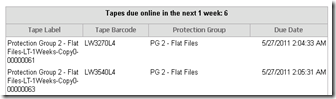
When the data on a tape has expired it will show in the Tape Management Report as Tapes due online in the next x weeks.
image

When you do not add the tape back in the library the tape will eventually show up as over due Tapes.

image

There might be a situation where you are unable or unwilling to place the tape back in the library. For instance when the tape is broke, has been in the cycles for to long or the tape is even lost. In these cases you don’t want the tape to show up in report each week.

The procedure below (written by Mike Jacquet from Microsoft ) shows how to remove tapes from the Tape Management Report.

To remove a tape media from the over due tape report, you can run a SQL script to remove the media from the DPM database.

To run the script, perform the following steps:

1)  Open the DPM console and under the reporting tab, double-click the "tape management" report and select the number of weeks you want a report for (up to 4 weeks).
2)  Once the report opens- go to the page that list Over Due Tapes.
3)  Make a note of the "Tape labels"  for the tapes you want to remove from the DPM database so they will no longer show up on the report.

4) Make a backup of the DPMDB Sql database before proceeding using the following command:

     DPMBACKUP -db (The database will be saved in the C:\Program Files\Microsoft DPM\DPM\Volumes\ShadowCopy\Database Backups folder.

5) Open SQL Enterprise manager and connect to the Server_name\$MSDPM2010 instance.

6) Under DATABASES - Highlight the DPMDB entry - then click on "NEW QUERY" button.
7)  Copy / paste the following SQL script into the new query window.

---------- START COPY HERE -------------

-- overdue tapes
-- for clarity, set up the parameter as a variable
declare @paramTapeLabel as nvarchar(256)
set @paramTapeLabel = N'SAMPLE_TAPE_LABEL_NAME'

-- keys
declare @vMediaId as guid
declare @vGlobalMediaId as guid

-- if the delete gives trouble, add keyset after cursor
declare cur_label cursor
for select MediaId, GlobalMediaId
from tbl_MM_Media
where label = @paramTapeLabel;

open cur_label
while (0 = 0)
begin
fetch next from cur_label into @vMediaId, @vGlobalMediaId
-- test for being done
if @@fetch_status <> 0 break;

print 'Deleting MediaId = ' + cast(@vMediaId as varchar(36))
-- do a set of deletes atomically
begin transaction;
delete from tbl_MM_TapeArchiveMedia
  where MediaId = @vMediaId;

delete from tbl_MM_MediaMap
  where MediaId = @vMediaId;

delete from tbl_MM_ArchiveMedia
  where MediaId = @vMediaId;

delete from tbl_MM_Global_ArchiveMedia
  where MediaId = @vGlobalMediaId;

delete from tbl_MM_Global_Media
  where MediaId = @vGlobalMediaId;

delete from tbl_MM_Media
  where current of cur_label;

commit transaction;

end
close cur_label
deallocate cur_label

-------------- END COPY HERE ----------------------

8)  replace the tape label name parameter in the script with the name of the tape label from the over due tape report that you want to delete.
        set @paramTapeLabel = N'SAMPLE_TAPE_LABEL_NAME'      <--- replace tape label between the single quotes ' '

9) Execute the SQL script.

10)  Repeat steps 8. and 9. for each tape label that you want to delete.


Tuesday, March 15, 2011

DPMbackup Invalid command -db.

The DPMbackup.exe command is a very useful tool to make a copy of your DPM database to a disk location. Using this copy you can easily recover from a corrupt database.

For our customers a use a scheduled task to make a dump of the DPM to disk on a daily bases. It has saved me from a full reinstall more then ones.

The issue I run in to is that the command DPMbackup –DB works perfectly from the command prompt, but when I use it in a script it gives me the following eror  {Error: Invalid command –db.}

In my case it worked to specify the instance name as well. Like: DpmBackup.exe -db -instanceName MSDPM2010

Full Script

@Echo off
SET LOGFILE="E:\Backup_folder\SQL Daily Backup\DPMSQLBACKUP.LOG"
SET backupfile="C:\Program Files\Microsoft DPM\DPM\Volumes\ShadowCopy\Database Backups\DPMDB.bak"
SET backuppath="E:\Backup_folder\SQL Daily Backup\"

for /f "tokens=2,3,4 " %%x in ("%date%") do set dstamp=%%z%%y%%x
for /f "tokens=1,2,3 " %%x in ("%time%") do set tstamp=%%x%%y%%z

ECHO ===================================================================>> %LOGFILE%
ECHO %dstamp% - %tstamp% >> %LOGFILE%
ECHO ===================================================================>> %LOGFILE%
DpmBackup.exe -db -instanceName MSDPM2010 >> %LOGFILE%
if not exist %backupfile% goto NOTEXIST
IF Exist %backuppath%\DPMDB_05.* del %backuppath%\DPMDB_05.*
IF Exist %backuppath%\DPMDB_04.* ren %backuppath%\DPMDB_04.* DPMDB_05.*
IF Exist %backuppath%\DPMDB_03.* ren %backuppath%\DPMDB_03.* DPMDB_04.*
IF Exist %backuppath%\DPMDB_02.* ren %backuppath%\DPMDB_02.* DPMDB_03.*
IF Exist %backuppath%\DPMDB_01.* ren %backuppath%\DPMDB_01.* DPMDB_02.*
IF Exist %backuppath%\DPMDB.* ren %backuppath%\DPMDB.* DPMDB_01.*

ECHO. >> %LOGFILE%
copy %backupfile% %backuppath% /Y >> %LOGFILE%
GOTO END

:NOTEXIST
ECHO DPMSQL DB BACKUP does not exist!!! >> %LOGFILE%

:END
ECHO ===================================================================>> %LOGFILE%
ECHO. >> %LOGFILE%
ECHO. >> %LOGFILE%

Six copies will remain on this location. DPMDB.bak is the most recent DPM SQL Backup and DPMDB_05.bak is the oldest backup file.