Checking the event log of the DPM server I found the following errors.
----------error 1------------------
Log Name: Application
Source: Report Server Windows Service (MSDPMV3BETA1EVAL)
Date: 5/22/2010 5:55:58 PM
Event ID: 139
Task Category: Startup/Shutdown
Level: Error
Keywords: Classic
User: N/A
Computer: xxxxxxx.c2ict.com
Description:
The application domain WindowsService_0 failed to start. Error: Microsoft.ReportingServices.Diagnostics.Utilities.EvaluationCopyExpiredException: The evaluation period for this instance of Microsoft SQL Server Reporting Services has expired. A license is now required.
----------error 1------------------
----------error 2------------------
Log Name: Application
Source: Report Server Windows Service (MSDPMV3BETA1EVAL)
Date: 5/22/2010 5:55:58 PM
Event ID: 136
Task Category: Activation
Level: Error
Keywords: Classic
User: N/A
Computer: xxxxxx.c2ict.com
Description:
The evaluation period for this instance of Microsoft SQL Server Reporting Services has expired. A license is now required.
----------error 2------------------
----------error 3------------------
Log Name: Application
Source: Report Server Windows Service (MSDPMV3BETA1EVAL)
Date: 5/22/2010 5:55:57 PM
Event ID: 107
Task Category: Management
Level: Error
Keywords: Classic
User: N/A
Computer: xxxxxx.c2ict.com
Description:
Report Server Windows Service (MSDPMV3BETA1EVAL) cannot connect to the report server database.
----------error 3------------------
The service manager shows also that the SQL and SQL reporting services could not start and stopped
Checking the installed SQL instances shows that there is a second instance still active from the previous (beta) version of DPM 2010.
This instance can successfully be removed using the remove program wizard in the control panel.
Select remove.
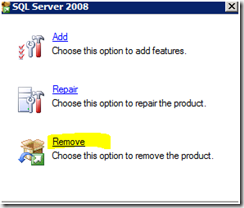
Select the old/expired instance


