Thursday, August 19, 2010

Remove (untrusted) machines from agents tab

The uninstall agent option is not available for untrusted machines in DPM 2010. Therefore you need to remove the agents manually (Using uninstall program in control panel).

To remove the machine from the agent tab you need to use the remove-productionserver.ps1 Powershell script.

image

Attach untrusted machines using FQDN

DPM 2010 now supports protection of Workgroup machines and machines in untrusted domains. The agents needs to be installed manually after that you specify the DPM server with the setdpmserver command

Namespace
In configurations where the name space of the DPM server is different then the name space of the protected server. It could be necessary to use the –productionServerDnsSuffix. This allows you to attach the DPM agents in the console using Full qualified DNS name instant of NETBIOS name. The –productionServerDnsSuffix should specify the FQDN of the protected server.

C:\Program Files\Microsoft Data Protection Manager\DPM\bin>SetDpmServer.exe –dpm servername server01.domain.ad -isnondomainserver -username user01 -productionServerDnsSuffix dmz.local

image

Wednesday, June 23, 2010

Monday, June 21, 2010

Recatalog an Expired Tape

By default you are unable to restore data from a expired tape. Also the recatalog option is disabled for expired tapesWhen a has expired in DPM 2007. But you can use the following work around.

1) In the DPM admin console select the TAB Library Management, Select the Tape and mark the tape as Free.
mark_free 

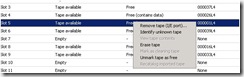
2) Select the tape again Unmark tape as Free
unmark_free

3) Now the option re-catalog imported tape is available
cat

4) After the catalog is completed you should be able to restore data from the tape
cat2

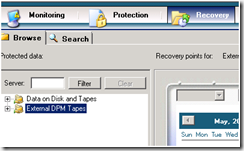
Note: On the restore tab you will find the items under External DPM Tapes
image 
When you use this option to restore a Exchange mailbox; On the restore tab you will be unable to drive down to mailbox level. It is also not possible to restore to the Recovery Store Group (RSG).

Friday, June 18, 2010

DPM vNext survey

With DPM 2010 just released this month, Microsoft is already thinking about the next release (Vnext).
your input is more then welcome. Share your thoughts on the Future Enhancements to DPM with the DPM Product Team.

Survey Link: http://connect.microsoft.com/site840/Survey/Survey.aspx?SurveyID=11130

Tuesday, June 15, 2010

SharePoint with multiple WFE servers

When starting protection of a SharePoint farm with multiple Web Front-End (WFE) servers, you need to perform additional step.
When you run the ConfigureSharePoint –EnableSharePointProtection command you might receive the following error in a environment with more then one WFE server.

Cannot start service SPWriter on computer '.'.
An error occurred while trying to start the Sharepoint Vss Writer.

In this case you first need to run the command:
C:\program Files\Common Files\Microsoft Shared\Web Server extensions\12\bin\Stsadm.exe -o registerwsswriter

Note: The administrator credentials you provide for the Windows SharePoint Services farm must be a local administrator on the WFE server

More info: TechNet forum

Wednesday, June 2, 2010

DPM Technet forum

System Center Data Protection Manager forum provides you an opportunity to join a community of DPM customers where you can share knowledge, get questions answered, and learn from others with IT environments similar to yours. Start by posting DPM related questions in the forum and leverage the knowledge available in the new forum community. There are a lot of feature experts from the community ready to help and ofcourse there are folks from Microsoft who design, build, test and support the product.

Link: http://social.technet.microsoft.com/Forums/en-us/dataprotectionmanager/threads